
MCP connector overview
What the official Novadesko connector for Claude, ChatGPT and Gemini does, its address, compatible clients and how a connection works.
Novadesko publishes an official MCP (Model Context Protocol) server. It lets an AI assistant read a Novadesko company's data and prepare actions (quotes, invoices, customers, reminders...), always with the user's explicit consent. The same tools and rules also power Nova AI, the assistant built into Novadesko.
Server address
Official address to paste into your AI client: https://mcp.novadesko.com.
https://mcp.novadesko.com/mcpis also accepted.- The former address
https://web.novadesko.com/mcpkeeps working for existing connections. - The same access token is valid on all three addresses.
HTTP transport: JSON-RPC 2.0 messages sent with POST. Accepted protocol versions: 2025-06-18, 2025-03-26, 2024-11-05. The mcp.novadesko.com domain only serves MCP and OAuth: the rest of the application is not exposed there.
Compatible clients
| Client | Status | Note |
|---|---|---|
| Claude (claude.ai, desktop app, mobile app) | available | Custom connector; depends on your Claude plan |
| Claude Code | available | claude mcp add --transport http |
| ChatGPT | available | Developer mode connectors |
| Gemini CLI | available | gemini mcp add --transport http |
| Gemini Enterprise | Google preview | Client ID created in Novadesko by the administrator |
| Consumer Gemini app | not available in Belgium | Announced by Google only in the US, personal accounts with a paid plan |
Any other MCP client that supports OAuth 2.1 with dynamic registration can connect. Its connections appear in Novadesko on the Integrations, Claude page so they stay revocable.
How a connection works
- The client calls
https://mcp.novadesko.comwithout a token: 401 response with aWWW-Authenticateheader pointing to the OAuth metadata. - The client reads the metadata, registers itself (dynamic registration) and opens the Novadesko authorization page.
- The user signs in to Novadesko if needed, picks one company and the permissions granted, then clicks Authorize.
- The client exchanges the code for an access token (PKCE S256) and calls
initializethentools/list. - Reads run directly. Any write or send goes through a
prepare_*tool that returns a preview and a confirmation token, then throughconfirm_actiononce the user agrees.
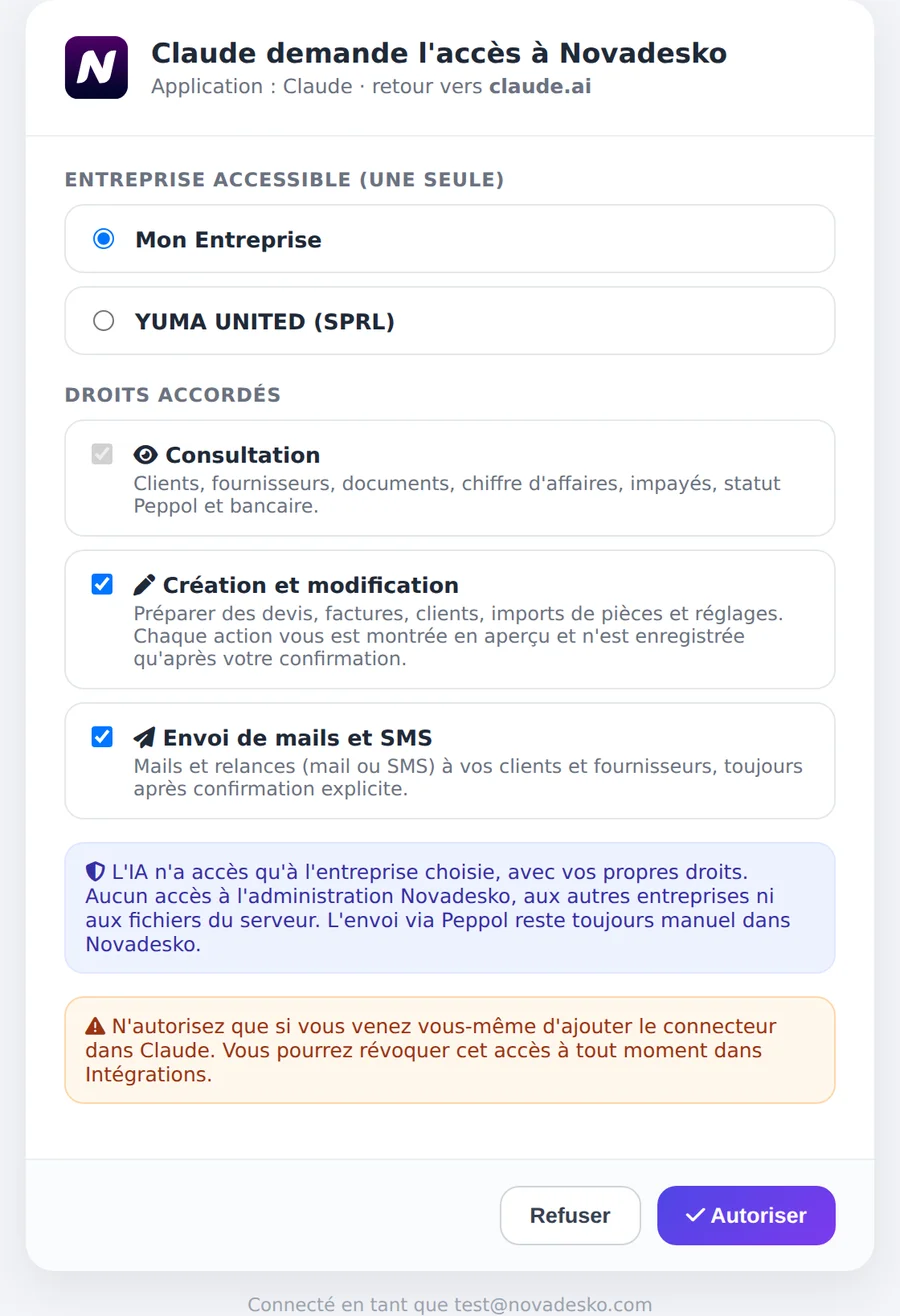
What the server does not expose
- no document sending over Peppol (Peppol sending stays manual in Novadesko);
- no access to files, the system, the database or the Novadesko admin;
- no company other than the one chosen at authorization;
- no account deletion or password change.
The company always comes from the OAuth connection, never from arguments. Parameters shop_id, company_id, user_id and similar are silently removed.